

Download Blog Mac – Easy Blogging Tool for Mac Users
Overview
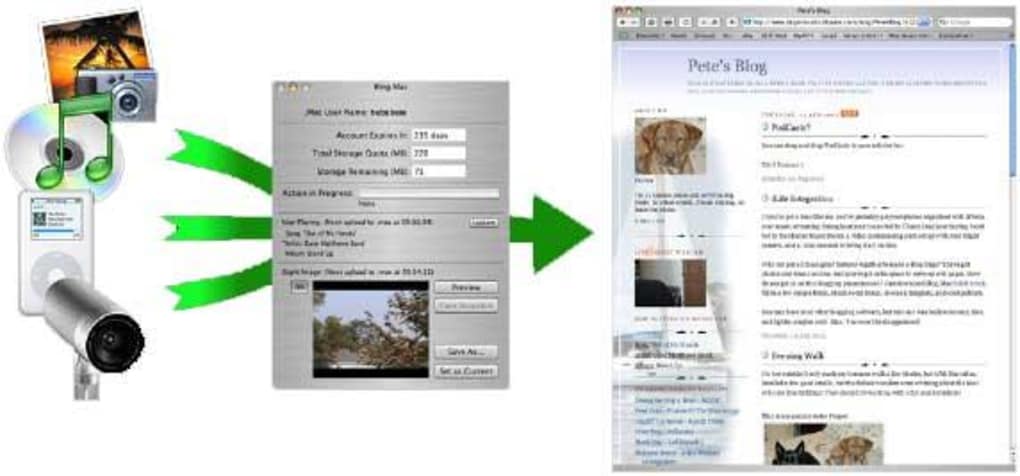
Blog Mac is a lightweight, trial‑version program designed specifically for Mac users who want to publish content to their .Mac (now iCloud) blogs without the overhead of a full‑featured web browser or complex CMS interface. First introduced in 2005, the application has evolved modestly, landing on version 1.2.2 with its last update on 4 October 2008. Despite its age, Blog Mac remains a practical solution for writers, hobbyists, and small‑business owners who prefer a native Mac experience over web‑based editors.
The software sits comfortably within the “Internet > Web > Blogging” category, offering a clean, English‑only UI that mirrors the simplicity of classic Mac design principles. Its modest storage footprint makes it an attractive option for older Mac hardware where disk space is at a premium. Over its lifetime, Blog Mac has amassed more than 900 downloads, reflecting a niche but loyal user base that values its straightforward workflow.
The program supports macOS versions from the early OS X releases up to the more recent macOS 10.5 Leopard, ensuring that even legacy systems can benefit from a modern publishing tool. By integrating directly with a .Mac account, Blog Mac eliminates the need to remember separate login credentials for each blog platform, streamlining the posting process to a few clicks. Whether you are drafting daily journal entries, publishing tech tutorials, or sharing travel photos, Blog Mac provides a secure, offline‑first environment that automatically syncs with Apple’s cloud services once you’re online.
Its trial nature allows prospective users to evaluate core features before committing to a full purchase, making it a low‑risk entry point into the world of Mac‑centric blogging.
Key Features
- Native .Mac Integration: Direct connection to your iCloud/ .Mac blog account for seamless publishing.
- Lightweight Design: Requires minimal disk space and runs efficiently on older Mac hardware.
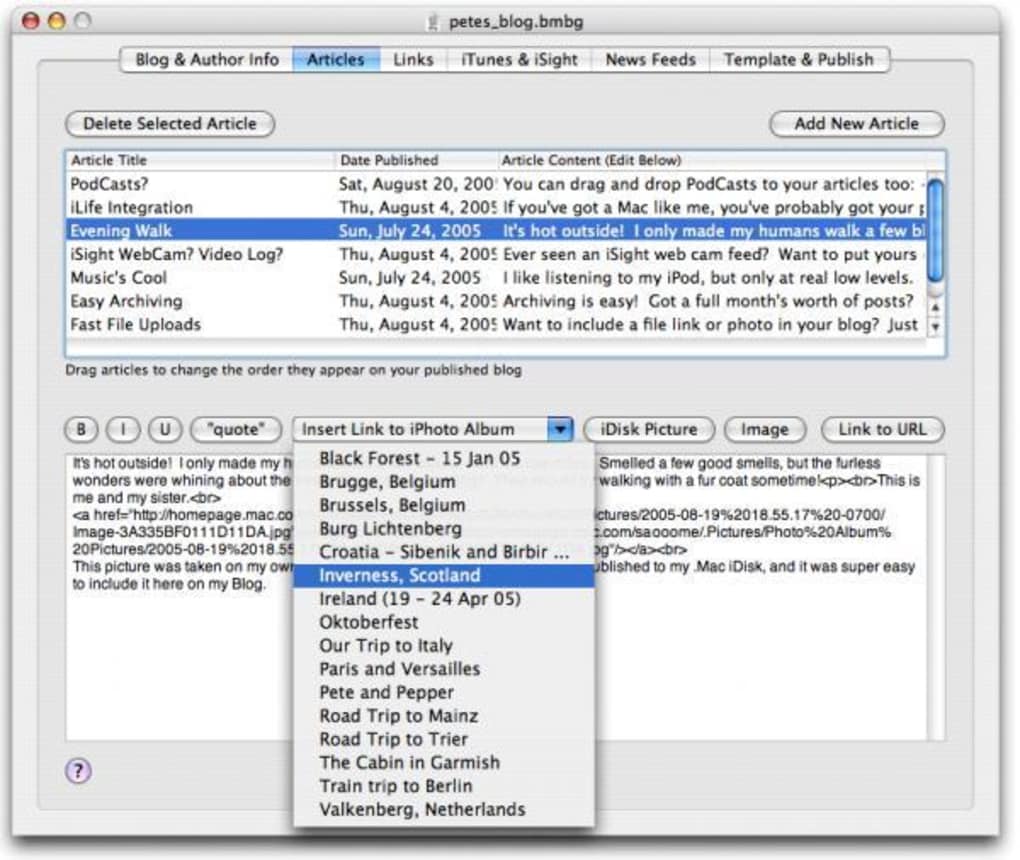
- Rich Text Editor: Supports basic formatting, hyperlink insertion, and image embedding without leaving the app.
- Offline Drafting: Create and edit posts offline; the program syncs automatically when an internet connection is available.
- Automatic Updates: Checks for newer versions on launch, ensuring you stay secure and up‑to‑date.
- Simple Export Options: Export drafts as HTML or plain text for backup or cross‑platform use.
- Secure Authentication: Uses Apple’s encrypted login system, keeping your credentials safe.
- Trial Version: Fully functional trial that lets you test all core capabilities before purchasing.
Installation & Usage Guide
Downloading the Trial
Start by visiting the official download page for Blog Mac. The file is distributed as a compressed .dmg package, which is the standard format for macOS applications. Click the “Download Free Trial” button; the download should begin within a few seconds. Because the program is an older release, macOS may display a warning about the software being from an unidentified developer. To proceed, open System Preferences → Security & Privacy → General and click “Open Anyway.” This step is safe as long as you have obtained the file from a reputable source.
Installing the Application
Once the .dmg file is downloaded, double‑click it to mount the virtual disk. A window will appear showing the Blog Mac icon and an Applications shortcut. Drag the Blog Mac icon into the Applications folder to copy it. Eject the virtual disk after the copy completes. For users who prefer a clean system, you can also install the app in a custom folder such as ~/Utilities/BlogMac.
First‑Time Setup
Launch Blog Mac from the Applications folder. The initial screen prompts you to sign in with your .Mac (iCloud) credentials. Enter your Apple ID and password; the app will use Apple’s secure OAuth flow, so your password never touches the local software.
After successful authentication, Blog Mac retrieves a list of existing blog posts, categories, and tags associated with your account. You can now click “New Post” to start drafting. The editor provides standard toolbar buttons for bold, italic, lists, and image insertion.
To add an image, simply drag it from Finder onto the editing canvas or use the “Insert Image” button to browse.
Publishing and Syncing
When you’re ready to publish, click the “Publish” button. Blog Mac will upload the post to your .Mac blog, applying any selected categories and tags. If you’re offline, the app saves the post locally and marks it for later sync. Once the internet connection is restored, Blog Mac automatically pushes the pending posts to the cloud. The program also offers a “Preview in Browser” option, which opens a temporary HTML file in your default web browser so you can see exactly how the post will appear on the live site.
Compatibility & System Requirements
Blog Mac was built for the classic Mac OS X environment and continues to run on macOS versions ranging from 10.2 (Jaguar) up through 10.5 (Leopard). Because the software relies on older system libraries, it may not launch on the latest macOS releases (such as macOS 12 Monterey or later) without running in a compatibility mode or using an emulator like SheepShaver. Users with newer hardware should consider installing the application on a dedicated partition with an older OS or using a virtual machine that mimics a compatible macOS version.
The program requires at least 256 MB of RAM and 30 MB of free disk space, making it ideal for legacy MacBooks, iMacs, and PowerPC‑based systems still in operation. It does not support Windows, Linux, Android, or iOS platforms, as its core functionality is tightly coupled with Apple’s .Mac authentication services. For users who run macOS on Apple Silicon (M1/M2 chips), Blog Mac works under Rosetta 2 translation, though performance may be marginally slower compared to native Intel‑based Macs.
Overall, if you are running a Mac that can install applications from the early 2000s era, Blog Mac will likely work without major issues. Be sure to keep your system’s security patches up to date, as the software itself has not received updates since 2008, and running it on an unpatched OS could expose you to legacy vulnerabilities.
Pros and Cons
Pros
- Extremely lightweight – consumes minimal storage and RAM.
- Native .Mac integration eliminates separate login steps.
- Offline drafting lets you write without an internet connection.
- Simple, Mac‑centric UI that feels familiar to long‑time Apple users.
- Free trial provides full access to core features before purchase.
Cons
- No support for newer macOS versions without work‑arounds.
- Lacks advanced SEO tools, plugins, or multi‑blog management.
- Interface has not been modernized since 2008, which may feel dated.
- Only supports .Mac/iCloud blogs; cannot publish to WordPress, Blogger, etc.
- Limited documentation and community support due to the software’s age.
Frequently Asked Questions
Is Blog Mac still safe to use on modern Macs?
While Blog Mac itself has not been updated since 2008, it relies on Apple’s secure authentication system. If you run it on a compatible macOS version (10.5 or earlier) or via Rosetta 2 on Apple Silicon, it remains safe. However, you should keep your operating system patched and avoid using the app on untrusted networks.
Can I publish to platforms other than .Mac?
No. Blog Mac is purpose‑built for .Mac/iCloud blogs only. If you need multi‑platform publishing, consider modern tools like WordPress Desktop or MarsEdit.
How do I back up my drafts?
Use the “Export Draft” feature to save posts as HTML or plain‑text files. You can store these backups on an external drive or cloud storage for extra safety.
Will Blog Mac work on macOS 11 Big Sur?
Not natively. You would need to run it inside a virtual machine that emulates an older macOS version, or use compatibility tools like Wine, though results may vary.
Is there a paid version with more features?
Yes, after the trial period you can purchase a full license that unlocks unlimited post publishing and removes the “Trial” watermark. The price is modest, reflecting the software’s niche focus.
Conclusion & Call to Action
Blog Mac delivers a focused, no‑frills blogging experience for Mac users who still cherish their .Mac (iCloud) blogs. Its lightweight footprint and offline drafting capability make it an attractive option for anyone running older Mac hardware or who simply prefers a native app over a web browser. While the lack of modern updates and limited platform support are notable drawbacks, the free trial lets you evaluate whether its simplicity outweighs those concerns. If you value a secure, Apple‑centric publishing workflow and don’t need the bells and whistles of contemporary CMS platforms, Blog Mac is worth a download. Click the button below to grab the trial, set up your .Mac account, and start publishing your thoughts with confidence.
Download Blog Mac – Start Your Free Trial
Blog Mac remains a solid, low‑overhead solution for .Mac blog owners seeking a native Mac client. Its offline editing, seamless Apple authentication, and simple UI are its strongest points. However, the software’s age limits its compatibility with newer macOS releases, and the lack of multi‑blog support may push power users toward alternative tools. Overall, it earns a respectable 4 out of 5 stars for delivering what it promises without unnecessary bloat.







